We have compiled a list of manufacturers, distributors, product information, reference prices, and rankings for Modeling software.
ipros is IPROS GMS IPROS One of the largest technical database sites in Japan that collects information on.

Modeling software(3D Scan) - List of Manufacturers, Suppliers, Companies and Products | IPROS GMS

Last Updated: Aggregation Period:May 06, 2026~Jun 02, 2026
This ranking is based on the number of page views on our site.

Modeling software Product List

1~5 item / All 5 items

Displayed results

SketchUp Studio

The top-tier series of SketchUp that comes with point cloud software and rendering software.

SketchUp Studio is the top-tier series best suited for applications in architecture, construction, civil engineering, plant management, and consulting. In addition to the features of the SketchUp Pro subscription, it includes the plugin software "Scan Essentials," which allows for the import and drawing of point cloud data in SketchUp, as well as point cloud synthesis and modeling based on point clouds. It also comes with "V-Ray for SketchUp," which enables realistic and photorealistic rendering. This valuable package allows users to import point cloud data obtained from 3D scanners or drones, combine it with models created in SketchUp, and create 3D models based on point cloud data, producing realistic perspectives using V-Ray. The cloud service "Trimble Connect" is also available with unlimited storage, allowing for group sharing and viewing of related drawings, documents, and photos for each project, accessible via browser, desktop app, or smartphone app.

  • Other CAD related software
  • Modeling software

Added to bookmarks

Bookmarks list

Bookmark has been removed

Bookmarks list

You can't add any more bookmarks

By registering as a member, you can increase the number of bookmarks you can save and organize them with labels.

Free membership registration

SketchUP Studio

SketchUP Studio enables intuitive modeling based on point cloud data obtained from the DPI/Dot3D series!

SketchUP Studio is a software for architecture and civil engineering that allows for free 3D modeling with intuitive operations. You can freely model based on point cloud data scanned with the DPI/Dot3D series to match specific shapes. The modeled data can be exported in STL and other file formats, enabling the use of 3D data in BIM/CIM. It can be implemented at a low cost with a one-year subscription license. Please consider this low-cost, intuitive, and high-performance software!

  • Other CAD
  • Modeling software

Added to bookmarks

Bookmarks list

Bookmark has been removed

Bookmarks list

You can't add any more bookmarks

By registering as a member, you can increase the number of bookmarks you can save and organize them with labels.

Free membership registration

Scanat - Introduction of New Features

A new feature has been released that can significantly improve communication efficiency!

"Scanat" will undergo a version upgrade starting June 2023, including changes to app design and the addition of new features. You can automatically convert 3D models created in "Floor Plan Scan" mode into floor plan drawings. Additionally, the "CAD Drawing Creation Service," which creates drawings from captured 3D models, now supports a wider range of drawings. Furthermore, you can now instantly output measured dimensions, areas, and notes from the captured 3D models in CSV format. [Features] ■ Automatic conversion of floor plan drawings ■ Expansion of CAD drawing creation option services ■ Output function for measurement data and notes *For more details, please refer to the related links or feel free to contact us.

  • Company:nat
  • Price:Other
  • Other information systems
  • Modeling software

Added to bookmarks

Bookmarks list

Bookmark has been removed

Bookmarks list

You can't add any more bookmarks

By registering as a member, you can increase the number of bookmarks you can save and organize them with labels.

Free membership registration

[Video Now Available] Supporting CAD Conversion for Piping Design

Automatic modeling of piping, smoothly displaying large volumes of point clouds.

"The data is too heavy to handle properly—" "Removing the noise captured during scanning takes an enormous amount of time and effort—" "I am manually creating CAD models of piping based on point cloud data—" ⇒ Such challenges are solved by "InfiPoints." ■ What is 'InfiPoints'? ○ Overwhelming performance that makes the most of 3D scanner data ・ Displays any point cloud data smoothly without data size limitations ○ High-precision noise removal, automatic piping modeling, and interference simulation features ・ Automatically removes noise such as people captured during scanning ・ Automatically recognizes piping shapes from point cloud data and creates CAD models ・ Easily simulates collisions between point clouds and CAD *Please check out the video* ---------------------------------------------- Free trial currently available ☆ Feel free to contact us ☆ ----------------------------------------------

  • 3D measuring device
  • Modeling software

Added to bookmarks

Bookmarks list

Bookmark has been removed

Bookmarks list

You can't add any more bookmarks

By registering as a member, you can increase the number of bookmarks you can save and organize them with labels.

Free membership registration

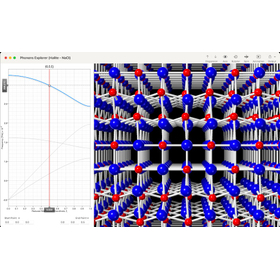
Crystal Animation for Semiconductor Design: "CrystalMaker"

Classic software for visualizing crystal structures and molecular structures.

In semiconductor design, understanding the properties of materials and designing optimal structures is a crucial factor that influences product performance. In particular, to enhance the reliability and efficiency of semiconductor devices, it is necessary to accurately grasp the crystal structure and molecular structure of materials and base the design on them. Even slight differences in structure can significantly impact device performance, making visualization and detailed analysis of structures essential. CrystalMaker is designed to help semiconductor designers intuitively understand the structure of materials and apply that understanding to their designs. 【Usage Scenarios】 - Crystal structure analysis of semiconductor materials - Material selection in device design - Visualization of simulation results - Analysis of the relationship between structure and physical properties - Development of new materials 【Benefits of Implementation】 - Easier visual understanding of material structures - Streamlining of the design process - Reduction in product development time - Improved accuracy of performance predictions - Realization of innovative device designs

  • CrystalMaker_0.png
  • building-spinel.jpg
  • cm-office.jpg
  • crystalviewer-viewer.jpg
  • crystal
  • X-ray Diffraction Equipment
  • Other physical property measurements and component analysis
  • Modeling software

Added to bookmarks

Bookmarks list

Bookmark has been removed

Bookmarks list

You can't add any more bookmarks

By registering as a member, you can increase the number of bookmarks you can save and organize them with labels.

Free membership registration